Cheats for PUBG: BATTLEGROUNDS

Cheats for PUBG: BATTLEGROUNDS on PC: Radar, ESP, Loot, No Recoil, Aimbot. 7 products from $1.93. Compare live statuses, system requirements and tariffs before buying.

Working: 3 of 7 Updated: Nov 19, 2026, 18:05 MSK 10 purchases in the last 7 days

How to choose a cheat for PUBG

Compare WebRadar, MEMEZ, SoftHub, Void and Arcane by features, launch method, system requirements and price.

Product Main features Launch Requirements Price
Browser-based radar for a second screen: enemies, teammates and bots, names, health and weapons; items, armor and vehicles; sharing with the squad. Activate via the Memez launcher and key; the radar runs in a browser on a separate device. Steam; Windows 10/11 (22H2, 24H2, 25H2); Intel/AMD CPU; NVIDIA/AMD GPU; borderless windowed mode; no spoofer needed. from $1.93
Player, item and vehicle ESP: boxes, distance, configurable colors and draw-distance limits; config save/load. No aimbot. Via the Memez launcher and key; step-by-step instructions are supplied with the key. Steam; Windows 10/11 (2004–23H2); Intel/AMD CPU; NVIDIA/AMD GPU; fullscreen mode; BIOS virtualization and Hyper-V; Visual C++ and DirectX; disable Windows Defender and remove third-party anti-cheats/antivirus software; no spoofer needed. from $4.61
ESP: 2D boxes, skeletons, health, names, distance, weapons, lead marker, lines and spectator list; loot, vehicles, filters and radar. No aimbot. In the launcher, log in, enter the key and click Load Cheat, then start the game; menu — F2, battle mode — F3. Steam; Windows 10/11 (21H1–25H2); Intel/AMD CPU; NVIDIA/AMD GPU; windowed or borderless mode; disable Windows Defender and remove third-party anti-cheats/antivirus software; no spoofer needed. from $3.03
Aim Assist with target leading, bone selection and target priority; recoil and sway control; player, loot and object ESP, radar, spectator list and gear filters. Launch through a launcher with an activation key; run the game in windowed or borderless mode; battle mode — F3. Steam; Windows 10/11 (21H1–25H2); Intel/AMD CPU; NVIDIA/AMD GPU; windowed or borderless mode; disable Windows Defender and remove third-party anti-cheats/antivirus software; no spoofer needed. from $3.64
Aimbot with RCS: bone selection, FOV, range, tracking speed and teammate check; player, loot and vehicle ESP with color and distance settings; radar and spectator panel. Use windowed mode and minimize the game without closing it; run the loader as administrator, select the game and click Launch; menu — INSERT. Instructions supplied with the key. Steam; Windows 10/11 (21H2, 22H2, 23H2); Intel/AMD CPU; NVIDIA/AMD GPU; windowed mode; run the loader as administrator; no spoofer needed. from $3.03
ESP without an aimbot: boxes and skeletons, health, distance, weapons and gear; loot, vehicles, projectiles, filters and an enemy-behind-you warning. Via the Memez launcher and key; detailed instructions are supplied with the key. Steam; Windows 10/11 (2004–23H2); Intel/AMD CPU; NVIDIA/AMD GPU; windowed mode; no spoofer needed. from $5.11
Aimbot with bone selection, prediction, recoil and sway control, FOV and smoothness settings; player, loot, vehicle and projectile ESP; radar, rear warning and skinchanger. Via the Memez launcher and key; detailed instructions are supplied with the key. Steam; Windows 10/11 (2004–23H2); Intel/AMD CPU; NVIDIA/AMD GPU; windowed mode; no spoofer needed. from $5.11

What is listed in the PUBG catalog

The PUBG: BATTLEGROUNDS catalog contains seven PC products: WebRadar, MEMEZ, SoftHub Lite, SoftHub, Void, Arcane ESP and Arcane Full. For player and item visuals, compare MEMEZ, SoftHub Lite and Arcane ESP. If you need aim assistance and shooting controls, look at SoftHub, Void and Arcane Full. WebRadar belongs in a separate group because it provides a radar rather than aiming tools.

Visuals only or a broader feature set

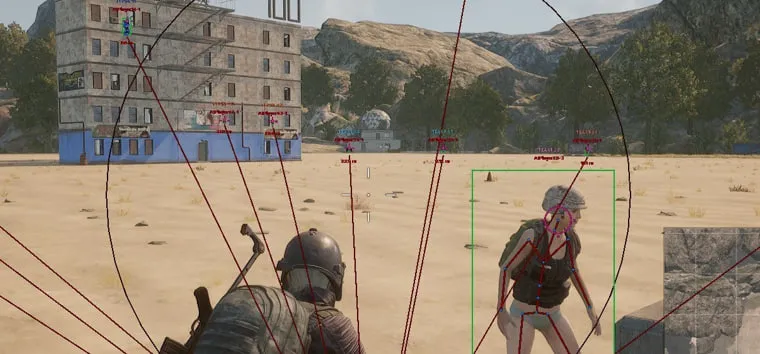
Arcane ESP has no aimbot: its product page lists boxes, skeletons, health, distance, equipment, loot and vehicle markers. Arcane Full adds an aimbot with target-bone selection, smoothness and FOV settings, recoil and sway control, and a radar. Void combines an aimbot with RCS, player and loot ESP, a radar and a spectator panel. Start with the use case rather than the feature count: visuals alone, or visuals together with aiming tools.

A radar on a separate device

WebRadar opens in a browser on a phone, tablet or additional monitor. It displays enemies, teammates and bots, together with player names, health and weapons. Radar access can be shared with a squad. This format has no aimbot, so compare it by second-screen convenience and radar information rather than by shooting features.

PC and game compatibility

A general Windows 10–11 label does not replace an exact build check. Arcane ESP and Arcane Full list versions 2004–23H2, Void lists 21H2, 22H2 and 23H2, SoftHub Lite lists 21H1–25H2, and WebRadar lists 22H2, 24H2 and 25H2. Product pages also specify the Steam client, Intel or AMD processors, NVIDIA or AMD graphics cards and the required window mode. Before paying, check the OS version, game display mode and any additional preparation steps, since these differ between products.

Access duration, delivery and launch

Available terms depend on the product: Void offers 1, 3, 7 and 30 days; Arcane ESP offers 3, 15 and 30 days; Arcane Full offers 1, 7 and 30 days. The current price appears in the plan selector. The key is delivered immediately after payment, and both the key and detailed guide are available in the Purchases section of your account dashboard. Launch steps, menu hotkeys and game settings come from the specific product guide, so do not substitute instructions for another version.

Checks before ordering and getting help

Before buying, open the status summary and the selected product page. Sales may be paused during an update, and the pages do not promise an exact completion time. If you have a payment, key or launch issue, create a ticket with support and attach the order details, screenshots or a video. A working status describes product availability; it does not guarantee account safety or freedom from bans.

Common questions about PUBG: BATTLEGROUNDS

Should I choose Arcane ESP or Arcane Full?

Choose Arcane ESP if you only need visuals: boxes, skeletons, health, distance, loot and vehicles, without an aimbot. Arcane Full includes an aimbot, recoil and sway control, ESP and a radar. Their plans also differ: ESP access starts at 3 days, while Full has a 1-day option.

Which option provides a browser-based radar?

WebRadar runs in a browser on a separate phone, tablet or monitor. The radar can show enemies, teammates, bots, player names, health and weapons. Its radar link can be shared for squad viewing; this product has no automatic aiming features.

What access durations are available?

Void is offered for 1, 3, 7 or 30 days; Arcane ESP for 3, 15 or 30 days; Arcane Full, MEMEZ and SoftHub Lite for 1, 7 or 30 days. Select the term on the product page before paying: the final price and purchase availability depend on the chosen plan and the product's current state.

Where do I find my key and guide after purchase?

After payment, sign in to your account dashboard and open Purchases. Your activation key and step-by-step guide are stored there. Product pages state that the key is delivered immediately after payment; for launch, follow the guide for the exact version you bought.

Is Windows 11 24H2 supported?

Not by every product. SoftHub Lite and WebRadar include 24H2 in their supported versions. The Void, Arcane ESP and Arcane Full pages stop at 23H2. Compare your exact Windows build with the chosen product's requirements instead of relying only on the catalog's general Win 10–11 label.

Which window mode is required at launch?

Void and both Arcane versions specify windowed mode. SoftHub Lite requires fullscreen windowed (borderless), while WebRadar specifies Borderless windowed. Standard exclusive fullscreen may not be suitable, so set the mode stated in the specific product guide before launching.

What should I do while a product is being updated?

Check its row at /en/statuses and wait for sales to reopen. Product pages state that sales close during updates. No fixed completion time is published, so do not assume a specific restoration time unless support confirms one separately.

How can I get help with payment or launch?

Sign in and create a ticket at /en/support. Describe the stage where the problem occurred and attach a screenshot or video. For a payment issue, include the order ID and proof of payment. The conversation history remains in your account dashboard.

Reviews of PUBG: BATTLEGROUNDS products

March 25, 2026 ★★★★★

Ебанутый аим, ебашу как ебанутый без бана

All customer reviews

We use cookies to run the site, measure analytics and personalise marketing. See our privacy policy.